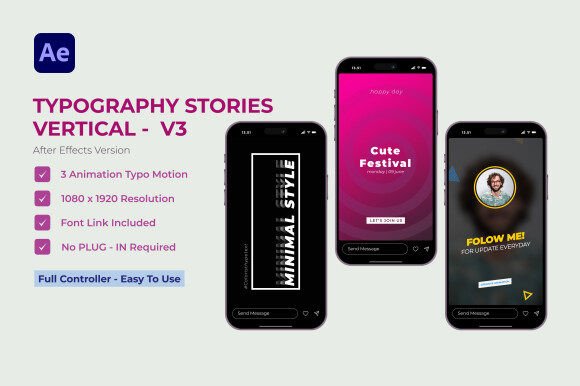
Typography Stories V3 | After Effects: Beyond Static Text
In the fast-paced world of social media, a static image often scrolls by unnoticed. For creators, influencers, and entrepreneurs, the challenge isn't just what to say, but how to make people stop and listen. This is where motion becomes your most powerful ally. The Typography Stories V3 template for After Effects is a design asset built for this exact moment, transforming your words into engaging visual narratives that capture attention in a crowded feed.
A Tool for Dynamic Storytelling
At its core, this is more than a set of animations; it's a modern typography toolkit. The style is clean, elegant, and minimalistic, ensuring your message remains the hero. Think of it as a premium font family that has learned to move. The animations are designed to feel intentional and professional, guiding the viewer's eye through your message with a sense of rhythm and purpose. This isn't about flashy distractions; it's about using motion to enhance clarity and emotional impact, a key principle in effective brand identity.
Where Motion Typography Excels
The true value of a resource like Typography Stories V3 lies in its versatility. Its applications extend far beyond Instagram Stories, making it a valuable piece in any creator's library of design assets.
- Social Media Graphics: This is its native habitat. Use it for Instagram Reels, TikTok videos, YouTube Shorts, and Facebook Stories to announce promotions, share quotes, or deliver quick tips. The dynamic nature inherently boosts audience engagement.
- Digital Advertising: Create short, impactful video ads for platforms like Meta or Google. A moving typographic message can often communicate a value proposition faster and more memorably than a static banner.
- Website and App Design: Incorporate animated text into hero sections or onboarding screens. This elevates the user experience, contributing to a perception of a polished and professional digital presence.
- Presentation and Pitch Decks: Add a layer of sophistication to key slides in a business presentation. A subtle text animation can emphasize a critical statistic or a powerful closing statement, aiding visual hierarchy.
- Personal Branding: For bloggers, podcasters, and influencers, consistent use of a specific animation style becomes recognizable. It's a subtle yet effective way to build brand consistency across all digital touchpoints.
Shaping Perception with Animated Text
Typography is never just about legibility; it's about feeling. The choice between a serif font and a sans serif font already sets a tone. When you introduce motion, you add another dimension to that personality. The animations in Typography Stories V3—whether a smooth fade, a sharp pop, or an elegant slide—are designed to convey a sense of modernity and sophistication. Using this template consistently can significantly influence how your audience perceives your brand, associating it with quality and attention to detail. This consistency is crucial for building recognition and trust, which are cornerstones of a strong brand identity.
Practical Guidance for Implementation
Adopting any new creative font or template requires a thoughtful approach. Here’s how to integrate this tool effectively into your workflow.
- Evaluate Project Fit: Before you begin, ask if the template's aesthetic aligns with your project. Its clean, minimalistic style is perfect for tech, lifestyle, fashion, and corporate brands. For projects requiring a script font or a handwritten font feel, this template might serve as a complementary element rather than the primary typeface.
- Master Font Pairing: The template is built to be customized. A key design skill is font pairing. Use the animated text for headlines and key phrases, and pair it with a highly readable body font in your static graphics or video captions. A common and effective pairing is a bold, modern display font for animation with a clean, neutral sans-serif for supporting text.
- Leverage Full Color Control: One of the most powerful features is the ability to control colors completely. Don't just stick to the defaults. Adapt the palette to match your brand's specific colors. This simple step transforms a generic template into a unique piece of your brand identity.
- Consider Readability in Motion: While the animations are eye-catching, always prioritize message clarity. Watch your final render on a mobile device. Does the text move too fast? Is the font size large enough to be read comfortably on a small screen? The best modern typography balances style with function.
- Understand the Licensing: As a commercial font and template resource, it's essential to review the licensing terms. Typically, these assets are licensed for use in a single end product (like your YouTube channel or a client's social media campaign), but always confirm the specifics to ensure you're using it correctly for both personal and commercial projects.
Ultimately, Typography Stories V3 for After Effects is a practical solution for a common creative challenge. It provides a professional framework for anyone—from small business owners to seasoned marketers—to create compelling visual content without needing advanced animation skills. By focusing on clear communication and leveraging the template's customization options, you can produce content that not only looks good but also strengthens your connection with your audience.