Design Stunning Photo Session Cards with This PSD Template
A Designer’s Go-To for Client Presentations
As a photographer or creative professional, the first impression you make often happens long before a client steps in front of your lens. It’s in the materials you send—the welcome packet, the pricing guide, the session details. A beautifully designed photo session card does more than list information; it sets the tone for your entire brand experience. This is where a well-crafted template becomes an invaluable asset in your design toolkit.
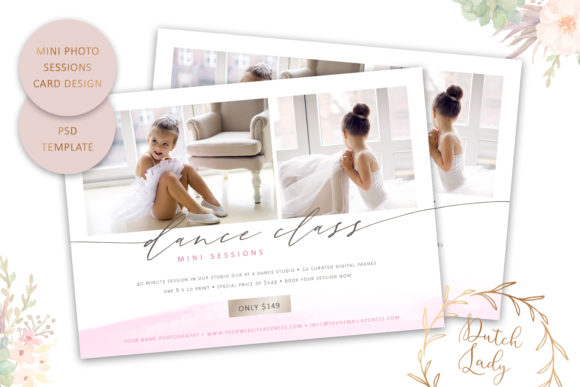
The Photo Session Card Template is a layered Photoshop file designed for US standard postcard dimensions (7x5 inches). It arrives as a high-resolution, 300 dpi PSD file, ensuring your final printed piece looks crisp and professional. The real power lies in its customization. Every element is editable: you can adjust the text for color, size, and position, change the colors of the background, decorative watercolor elements, and pricing boxes, and the necessary font files are even included. This isn't just a static image; it's a flexible foundation for your brand's visual communication.
Where This Template Shines: From Brand Identity to Marketing Collateral
Think of this template as a core component of your broader brand identity system. Its clean, modern aesthetic with a touch of artistic flair (thanks to the watercolor smear) makes it versatile for a range of creative businesses. It’s perfect for photographers, of course, but also for graphic designers offering branding packages, event planners, boutique studios, and even florists or artisans who host seasonal sessions.
The applications extend far beyond a simple session card. Use it to create:
- Marketing Materials: Design promotional postcards for direct mail campaigns or leave-behinds at local businesses.
- Digital Content: Adapt the layout for social media graphics to announce mini-sessions or special offers.
- Client Onboarding: Include it in a welcome PDF or as part of a beautifully designed pricing guide.
- Event Invitations: Modify it for styled shoot invitations or workshop announcements.
Its strength is in its ability to maintain visual consistency across different touchpoints, reinforcing your brand with every piece of communication.
The Impact of Thoughtful Design on Your Business
A template like this does more than save you time; it elevates your professionalism. When a potential client receives a thoughtfully designed card, it communicates attention to detail and quality—key attributes anyone hiring a creative professional wants to see. This influences brand perception immediately. It suggests you value your work and, by extension, will value their project.
From a practical design standpoint, the template provides a strong visual hierarchy. The structure guides the viewer’s eye from the most important information (your brand name, the offer) to the supporting details (session specifics, contact info). This clarity improves readability and ensures your message is communicated effectively, which is crucial for audience engagement. Using it consistently helps build brand recognition; clients will start to associate your specific style and color palette with your business.
Practical Tips for Using Your Photo Session Card Template
Getting the most out of this design asset involves a few straightforward steps. First, ensure you have the correct software: Adobe Photoshop CC or CS6. It’s important to note it is not compatible with Photoshop Elements. Once you open the PSD, take a moment to explore the layer structure. Well-organized layers make customization intuitive.
When personalizing the template, consider these points:
- Font Pairing: While the included fonts are carefully chosen, you can experiment. If you swap them, aim for a balanced pairing—a serif font for headings can pair nicely with a clean sans serif font for body text, or vice versa. Avoid using two very similar display fonts together.
- Color Palette: Align the customizable colors with your existing brand palette. This is non-negotiable for maintaining a cohesive brand identity. Use your primary brand color for key elements and secondary colors for accents.
- Readability First: As you adjust text size and position, always prioritize readability. Ensure there is sufficient contrast between text and background colors. Print a test copy or view it at actual size on screen to check legibility.
- Printing Preparation: The template is built with adequate bleed and trim marks for professional printing. When you send it to a print shop, specify the 7x5 inch postcard size. For the best results, export your final design as a high-quality PDF or TIFF file.
Integrating the Template into Your Creative Workflow
This Photo Session Card Template is more than a one-off design; it's a reusable design asset. Create a master version with your core branding, then duplicate and tweak it for different campaigns—holiday minis, spring sessions, limited-edition offers. This approach saves hours of design work while keeping your materials looking polished and on-brand.
For small business owners and entrepreneurs, leveraging professional templates is a smart strategy. It allows you to produce high-quality marketing design and editorial design pieces without the overhead of a full-time designer or the generic look of basic online tools. It bridges the gap between needing custom work and relying on simplistic solutions, giving you the tools to present your business with the professionalism it deserves.
Ultimately, a tool like this empowers you to focus on what you do best—creating beautiful work and serving your clients—while ensuring the supporting materials that represent your business are equally impressive and effective.