Spooky Invitations in Minutes: Your Halloween Party Solution
Halloween is creeping closer, and the pressure is on. You want to host an unforgettable party, but the thought of designing invitations from scratch feels like a chore. Traditional paper invites are costly and slow, and generic digital cards just don't capture the spooky spirit you're after. What if you could create a professional, animated invitation directly from your smartphone, edit it in minutes, and send it to your entire guest list without any design software?
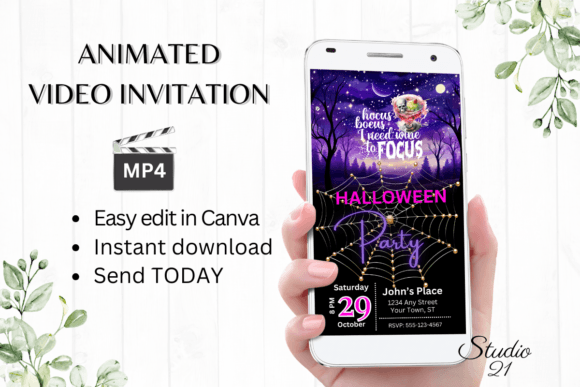
That's the exact problem the Smartphone Halloween Party Invitation digital template solves. This isn't just another static image. It's a fully animated video invitation template designed for speed, personalization, and maximum visual impact. The style leans into modern Halloween aesthetics—think clean, bold typography paired with eerie, playful animations. It strikes a balance between spooky and sophisticated, avoiding overly childish themes. The visual personality is confident and engaging, using smooth transitions and carefully chosen color palettes that look fantastic on both phone screens and desktop monitors. It feels premium and polished, a crucial detail for establishing a strong brand identity for your event from the very first touchpoint.
Designed for the Modern Creative Workflow
The true value of this Smartphone Halloween Party Invitation template lies in its seamless integration into how we actually work today. As a designer or content creator, you understand that flexibility is key. This template provides immediate access through Canva, the ubiquitous web-based design tool. There's no software to download, no fonts to install, and no waiting for a proof from a third party. You click the link, and you're editing.
This approach respects your time and creative process. The template is built with a clear visual hierarchy, guiding you to personalize the most important elements first: the event details. The text is easily editable, allowing you to change font styles, colors, and sizes to match your specific theme or brand guidelines. Want to swap the animation style? You can do that within Canva's interface. This level of control transforms the template from a rigid product into a flexible design asset. It's perfect for:
- Event Planners & Marketers: Create multiple versions for different client parties or themed events with consistent branding.
- Small Business Owners: Host a customer appreciation Halloween event and send invitations that reflect your business's professionalism.
- Bloggers & Content Creators: Promote a virtual Halloween hangout or giveaway to your audience with a visually compelling invitation that stands out in crowded inboxes and social feeds.
- Individuals & Hobbyists: Make your personal party the talk of the town with an invitation that looks like it was made by a professional designer.
From Edit to Inbox: A Practical Guide
Let's walk through the real-world application. After purchasing, you receive a PDF with your unique Canva template link and a straightforward user guide. Once you open the template, the editing process is intuitive. The core strength here is the ability to personalize text with zero friction. You can add or delete text blocks, ensuring your message is clear and concise. The template's structure provides a natural visual hierarchy, making sure the "What, When, and Where" are immediately legible—a critical principle in effective web design and social media graphics.
The animation styles are pre-set but can often be adjusted, adding a dynamic layer that a static image simply can't match. This motion captures attention on platforms like Instagram Stories, Facebook, and within messaging apps. Once you're satisfied, the next step is sharing. You download your personalized creation as a high-quality MP4 file. This video format is universally compatible. You can send it directly via text message, iMessage, WhatsApp, or Messenger. For email invites, you can upload the MP4 or, even better, use Canva's sharing link to forward a web-based version. This versatility ensures your invitation looks perfect, whether viewed on a laptop or a smartphone.
Making It Your Own: Beyond Basic Edits
While the template is designed for speed, it also allows for deeper customization if you have the time and inclination. Consider these practical tips to elevate your invitation further:
- Evaluate Font Pairings: The template likely uses a strong display font for headings. If you change it, ensure you pair it with a complementary font for the details. A bold, spooky serif font or a gritty script font can be paired with a clean sans serif font for readability. Always test the pairing at the size it will be viewed.
- Check Readability: Halloween themes often use dark backgrounds. Ensure your text color has sufficient contrast. A bright white or a vibrant orange can pop against black or deep purple. Avoid overly ornate handwritten fonts for the main details; save them for accents.
- Align with Your Brand: If you're a business, incorporate your brand's color scheme subtly. You don't need to plaster your logo everywhere, but using your primary accent color in the text or a subtle graphic can reinforce brand identity without feeling corporate.
- Consider the Medium: An invitation for a sophisticated adult costume party might use a more elegant typeface and muted colors, while a family-friendly event could use brighter, more playful animations. The template's style should match your event's personality.
Remember, colors may vary slightly depending on the device used to view the final MP4, a common consideration in digital design assets. Always do a quick test send to yourself on your phone and computer before blasting it out to your guest list. This Smartphone Halloween Party Invitation template isn't just a product; it's a streamlined workflow. It empowers you to create professional, animated content that engages your audience, saves you hours, and ensures your Halloween event starts with a creative and memorable first impression. The ability to edit, iterate, and distribute within minutes is a game-changer for anyone who values both quality and efficiency in their creative projects.